Saturday, 10 October 2015

[ROM][Z2] [LP-5.1.1] [LB/UB] [.232] [AROMA] PhoeniX | v1.0 | 10/10/15


Hello friends,

Here I present a new ROM, PhoeniX based on Lollipop stock firmware 23.4.A.1.232. Tested almost everything available to our device and took out the best and bug-free things to cook this ROM for Z2. I own this device,so I know what it require and sure that, this ROM will be smooth,fast and maintain a balance b/w performance and battery. Give it a try n feel the power, it costs u nothing..;)


Quote:


FEATURES
  • Based on latest firm .232

  • Aroma Installer

  • Fully Deodexed, Rooted With Latest SuperSU

  • Latest NUT Dual Recovery.

  • SystemUI Fix

  • Fully Patched Superuser Mod

  • Full fixed Stagefright

  • Better Battery Life

  • Init.d Support with some tweaks

  • PhoeniX Boot Animation.

  • Latest Walkman beta.

  • NFC icon in Status Bar when on.
    and more inside zip. ;)

Z5 Apps


  • Z5 X Reality + Supervivid

  • Z5 Sound Enhancement

  • Z5 Media Apps- some of them updated

  • Z5 SetupWizard

  • Z5 InCallUI and Conversation

  • Z5 Smart Backlight Control

  • Z5 Smart Call Handling

  • Z5 Clock App

  • Z5 Clock Widget

  • Z5 Calendar App

  • Z5 Home App and add-ons

  • Z5 Smallapps & Launcher

  • Z5 Wallpapers

  • Z5 Media Sounds

  • Z5 Themes & Live Wallpaper

  • Z5 Update Center

  • Z5 Photo Analyzer

  • Z5 Sound Picker

  • Xperia Z5 Photo Widget Release


INSTRUCTIONS

Doing Fresh installation:


  • Flash latest rootable Sony's rom with flashtool or flash prerooted Lollipop firmware

  • Root your phone and install dual recovery. (Skip this if flashed prerooted firmware with recovery)

  • Reboot to recovery, Wipe Data, Cache and Dalvik/ART Cache.

  • Then flash the ROM.

  • ONLY FOR D6502 USERS:>> Flash the Provided PATCH in Download Section. Sorry, I forgot to include it in Aroma.

  • Reboot your phone and enjoy..! :D


Quote:


It will take some time for the first start up. After start up go through the setup wizard and after completion leave the phone for 2-3 minutes to set up your configuration. Reboot again to enable other tweaks. ;)


Installation over Stock Sony Lollipop:


  • Backup your data

  • Reboot to recovery

  • Wipe Cache n Dalvik

  • Flash the rom.

  • ONLY FOR D6502 USERS:>> Flash the Provided PATCH in Download Section. Sorry, I forgot to include it in Aroma.

  • Reboot Phone and Enjoy.


Installation over anyother ROM or anything : FRESH Installation is recommended. Please don't post bugs after dirty flash.
Thank you all.


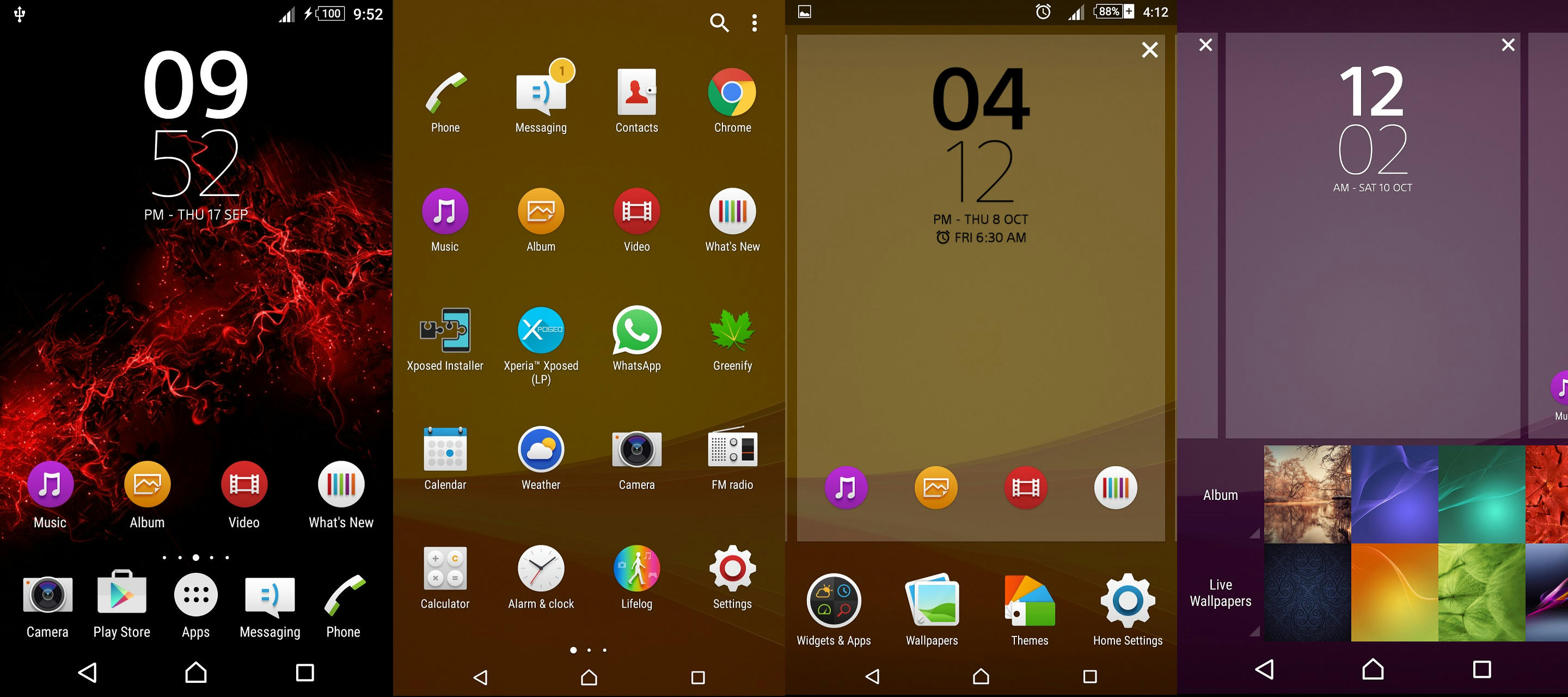
Screenshots


NOTE

Quote:


For Better Battery:>>Only if you are more concerned about battery ;)
  • Use Greenify app.

  • Go to Settings> Wifi>Advanced>Scanning always available>Turn it OFF.

  • Set screen on time to 15 or 30secs.

  • Turn off softkeys vibration.

  • Set static wallpaper,nothing new :)


CREDITS
| NUT | Chainfire | Serajr | Rajeev | gamzekal | Ben Ling | lagucool | neroyoung | shehabskull | alone_in_dark | neroyoung | abo hani | and thanks to SONY

XDA:DevDB Information
PhoeniX, ROM for the Sony Xperia Z2

Contributors
jitz975
ROM OS Version: 5.1.x Lollipop
ROM Kernel: Linux 3.4.x
ROM Firmware Required: Root & Recovery

Version Information
Status: Stable
Current Stable Version: v1.0
Stable Release Date: 2015-10-10

Created 2015-10-10
Last Updated 2015-10-10


No comments:

Post a Comment